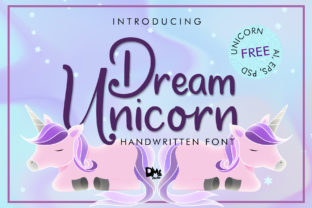
Dream Unicorn: The Handwritten Font for Playful Digital Experiences
In the world of web design and UI design, selecting the right typeface is often the difference between a generic template and a memorable brand identity. While many designers default to standard sans serif fonts for body text, the true magic happens in the headers and decorative elements where personality shines. This is where Dream Unicorn, a lovely, cute, and sweet handwritten font from the Script Amp collection, becomes an essential asset. It is not just a typeface; it is a tool that can transform the visual hierarchy of your landing pages, app screens, and online stores.
Dream Unicorn captures the whimsical nature of a child's drawing while maintaining enough structure to be legible on digital devices. Its strokes are fluid and organic, mimicking the natural movement of a pen across paper. For a digital product creator, this means you can inject warmth and approachability into interfaces that often feel too sterile or corporate. Whether you are building a boutique online store, a creative portfolio, or a coaching website, this script font adds a layer of human connection that users respond to positively.
Strategic Placement for Visual Hierarchy
One of the most critical aspects of modern typography is knowing where to apply a display font. Dream Unicorn is not designed to carry heavy blocks of text; instead, it excels as a display element. Imagine using it for your main hero title on a landing page. When paired with a clean, minimalist background, the playful curves of the letters immediately draw the eye, establishing a clear focal point before the user even reads the sub-headline.
This strategic use supports better scanning behavior. Users rarely read every word on a webpage; they scan for cues. A unique handwritten font like Dream Unicorn acts as a visual anchor. You might use it for section headings in a blog post, call-to-action buttons on a sales page, or even as a decorative accent in a navigation bar. By reserving this font for short phrases and key messages, you create a rhythm that guides the user through the content without overwhelming them.
For instance, consider a course sales page. Using a standard font for the "Enroll Now" button is functional but forgettable. Replacing that text with Dream Unicorn makes the action feel more inviting and personal, potentially boosting engagement. Similarly, in a creative portfolio, using this font for project titles can instantly communicate the artist's style and attention to detail.
Readability and Responsive Design Considerations
While the charm of Dream Unicorn is undeniable, a responsible designer must prioritize readability across all devices. On mobile screens, space is at a premium, and intricate details can sometimes blur if the font size is too small. To maintain clarity, I recommend using this font primarily for headlines larger than 24 pixels. For smaller interface elements like tiny labels or footer text, switch to a highly legible sans serif font.
When placing Dream Unicorn over image overlays or busy backgrounds, contrast is key. If the background is dark, ensure the font color is light and perhaps add a subtle drop shadow or a semi-transparent backdrop to separate the text from the image. Conversely, on light backgrounds, a darker ink tone works best to prevent the letters from looking washed out. The goal is to ensure that the brand tone remains consistent without sacrificing accessibility.
Building Trust Through Brand Identity
In the digital marketplace, trust is built through consistency. A well-curated font pairing strategy is fundamental to a professional look. Because Dream Unicorn has such a distinct personality, it pairs exceptionally well with neutral, geometric sans serif fonts like Montserrat, Open Sans, or Lato. The contrast between the structured lines of the body copy and the fluid curves of the script creates a balanced composition that feels both modern and friendly.
For brands seeking an editorial feel, pairing this script with a classic serif font can elevate the aesthetic to something more sophisticated. This combination works beautifully for high-end fashion blogs, luxury skincare lines, or artisanal food websites. The commercial font license included with Dream Unicorn allows you to use these pairings across client projects, ensuring that your final deliverable looks polished and cohesive.
The emotional impact of this typeface cannot be overstated. In a sea of rigid, blocky designs, a cute and sweet font like Dream Unicorn signals creativity and empathy. It tells the user that the brand behind the screen cares about the little details. This is particularly effective for SaaS founders targeting creative professionals, bloggers who want to stand out, and marketers launching new products that need a splash of fun.
Practical Applications Across Digital Platforms
The versatility of this premium font extends far beyond simple web pages. Here are several practical ways to integrate it into your workflow:
- Landing Pages: Use it for the headline to grab attention immediately, then switch to a readable sans serif for the benefits list.
- Online Shop Banners: Create custom promotional graphics for seasonal sales or new arrivals where the font adds a festive touch.
- Social Media Graphics: Generate branded templates for Instagram stories or Pinterest pins where quick visual recognition is vital.
- Email Newsletters: Highlight subject lines or special offers within your email campaigns to increase open rates.
- App Screens: Apply it to welcome screens or achievement badges in gamified applications to enhance the user experience.
When designing for conversion, every pixel counts. By using Dream Unicorn to highlight value propositions or limited-time offers, you create a visual cue that stands out against the noise of the internet. However, always test your layouts. What looks perfect on a desktop monitor might need adjustment when viewed on a tablet or smartphone. Ensure that the line height and letter spacing are optimized for touch interactions.
Technical Details and Licensing
Before downloading any design assets, it is important to understand the technical specifications. Check the included styles to see if there are multiple weights or alternate characters available. Some versions of Dream Unicorn may include swashes or ligatures that add extra flair to specific letter combinations. These details can make a significant difference in the final output of your logo design or packaging design.
Most importantly, verify the file formats. Web designers typically need OTF, TTF, and WOFF/WOFF2 files to ensure the font renders correctly across different browsers. If you are building a responsive site, using the correct webfont format ensures fast loading times, which is a crucial factor for SEO and user retention. Additionally, check for multilingual support if you plan to reach a global audience.
Regarding licensing, remember that using a commercial font requires adherence to the terms set by the creator. A standard license usually covers web usage, meaning you can embed the font in your HTML/CSS code for unlimited page views. However, always review the specific agreement for your project, especially if you are distributing the font as part of a template or selling a digital product that includes the font files. Proper licensing protects both you and the designer, ensuring that your brand identity remains legally sound.
Ultimately, Dream Unicorn is more than just a decorative element; it is a strategic choice for anyone looking to humanize their digital presence. By combining its cute, handwritten style with thoughtful layout planning and solid typographic pairing, you can create web experiences that are not only visually stunning but also deeply engaging. Whether you are a seasoned UI designer or a creative entrepreneur, adding this script amp treasure to your toolkit will help you craft websites that truly resonate with your audience.